IDEAL Networks Cable Certifier RX Adapter
R164064 Includes Only: 1 x LC Receiver Adapter with Boot FT III-LC Rx adapter for MM and SM, 1 adapter.
Gallery
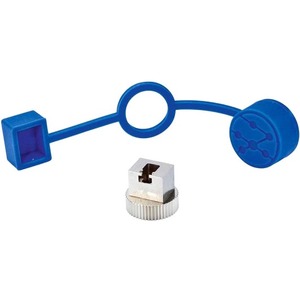
Attributes
| Brand name, Manufacturer name | TREND NETWORKS |
|---|---|
| Manufacturer | TREND NETWORKS ID NETWORKS US LLC |
| Extra Product Name | IDEAL Networks Cable Certifier RX Adapter |
| Weight | 1 0.13 |
| WeightUnit | lbs |
| moq, multiple, tierMinQty1, Packaged Quantity, PackageQuantity | 1 |
| MPN, Manufacturer Part Number, ModelNumber, Model_number, PartNumber, Part_number | R164064 |
| qtyInStock | 0 |
| SKU | 6KR950 |
| tierPrice1 | 345.57 |
| Manufacturer Website Address | http://www.idealnetworks.net |
| Brand Name | IDEAL Networks |
| Product Name, Product Type | Cable Certifier RX Adapter |
| Compatibility | IDEAL Networks FiberTEK III Cable Certifier |
| AdultProduct, Autographed, Memorabilia, TradeInEligible | False |
| Asin | B0B76J25KB |
| Brand | TREND Networks |
| Bullet_point | 1 adapter LC Rx adapter for MM and SM LC connector for Rx port of FiberTEK III modules. For use with multi-mode or singlemode |
| ClassificationId | 7701919011 |
| Currency | USD |
| DisplayName | Network & Cable Testers |
| Generic_keyword | LC connector for Rx port of FiberTEK III modules. Datacom and Networking Products > Fiber Optic Test LC Rx adapter for MM and SM 1 adapter |
| Height | 375 56 768 |
| Identifier | 0783250785278 783250785278 |
| IdentifierType | EAN UPC |
| ItemClassification | BASE_PRODUCT |
| ItemName, Item_name | TREND Networks R164064 - FiberTEK III LC Rx Connector (Formerly Ideal Networks) |
| Item_package_weight | 0.13 |
| Item_type_keyword | network-and-cable-testers |
| Keyword | R164055 |
| Link | https://m.media-amazon.com/images/I/31uLF4sbDML._SL75_.jpg https://m.media-amazon.com/images/I/31uLF4sbDML.jpg https://m.media-amazon.com/images/I/41wW9qaBNgL.jpg |
| List_price | 435.0 |
| Power_source_type | Adapter |
| ProductType | ELECTRONIC_CABLE |
| Product_description | TREND Networks R164064 - FiberTEK III LC Rx ConnectorOne-jumper Calibration Choose desired test standard in LanTEK. Collect 2 x LC-SC and 2 x LC-LC test cords. Clean and inspect each connector. Attach LC end to Rx port and SC end to Tx port of each module. Select Field Calibration from home screen. Press 1 Jumper (F2) calibration mode. Press Start (F1) icon to begin.Bi-directional Test Step 1 Disconnect test cord from Rx port of each module. Do not disturb connector at Tx port. Attach an LC-LC test cord to the Rx port of each module. Connect test cords to cable under test after cleaning the connectors of cable under test. Run Autotest.Measured loss includes the connection at the end of the test cords, the cord on the Rx port and the cable under test.Bi-directional Test Step 2 Reverse the test cord connections at both ends of the cable under test. Do not remove the connections to the FiberTEK III adapters, this will void the calibration. Press Continue (F1) to resume the test. The results for both ?bers in each direction will be displayed at test completion. R164053 - Cable kit SC/PC MM 50/125m R164054 - Cable kit FC/PC MM 50/125m R164055 - Cable kit ST/PC MM 50/125m R164056 - LC 50/125m cables and couplers R164057 - Cable kit SC/PC SM 9/125m R164058 - Cable kit FC/PC SM 9/125m R164059 - LC 9/125m cables and couplers R164061 - Cable and adapter kit LC MM 50/125m R164062 - Cable and adapter kit LC SM 9/125m R164064 - LC Rx adapter for MM and SM, each |
| Product_site_launch_date | 2021-05-27T21:26:06.603Z |
| Type | ean upc |
| Unit | pounds |
| Variant | MAIN |
| WebsiteDisplayGroup | biss_basic_display_on_website |
| WebsiteDisplayGroupName | BISS Basic |
| Width | 1024 500 75 |
Distributor offers
| Seller | SKU | MOQ | In stock | Multiple | Prices |
|---|---|---|---|---|---|
| PCNation | 6KR950 | 1 | 1 | 1 @ $345.57 | |
 usmegastore.com usmegastore.com | R164064 | 1 | -2 | 1 | 1 @ $416.80 |
| Graybar | 26380205 | 1 | 1 | 1 @ $685.97 | |
| R164064 | 1 | -2 | 1 | 1 @ $389.50 |
Related on Amazon
As an Amazon Associate, we earn from qualifying purchases. (paid link) CERTAIN CONTENT THAT APPEARS ON THIS SITE COMES FROM AMAZON. THIS CONTENT IS PROVIDED 'AS IS' AND IS SUBJECT TO CHANGE OR REMOVAL AT ANY TIME.
TREND Networks R164064 - FiberTEK III LC Rx Connector (Formerly Ideal Networks)
Brand: TREND Networks
TREND Networks R164064 - FiberTEK III LC Rx ConnectorOne-jumper Calibration Choose desired test standard in LanTEK. Collect 2 x LC-SC and 2 x LC-LC test cords. Clean and inspect each connector. Attach LC end to Rx port and SC end to Tx port of each module. Select Field Calibration from home screen. Press 1 Jumper (F2) calibration mode. Press Start (F1) icon to begin.Bi-directional Test Step 1 Disconnect test cord from Rx port of each module. Do not disturb connector at Tx port. Attach an LC-LC test cord to the Rx port of each module. Connect test cords to cable under test after cleaning the connectors of cable under test. Run Autotest.Measured loss includes the connection at the end of the test cords, the cord on the Rx port and the cable under test.Bi-directional Test Step 2 Reverse the test cord connections at both ends of the cable under test. Do not remove the connections to the FiberTEK III adapters, this will void the calibration. Press Continue (F1) to resume the test. The results for both ?bers in each direction will be displayed at test completion. R164053 - Cable kit SC/PC MM 50/125m R164054 - Cable kit FC/PC MM 50/125m R164055 - Cable kit ST/PC MM 50/125m R164056 - LC 50/125m cables and couplers R164057 - Cable kit SC/PC SM 9/125m R164058 - Cable kit FC/PC SM 9/125m R164059 - LC 9/125m cables and couplers R164061 - Cable and adapter kit LC MM 50/125m R164062 - Cable and adapter kit LC SM 9/125m R164064 - LC Rx adapter for MM and SM, each
Details
- LC connector for Rx port of FiberTEK III modules. For use with multi-mode or singlemode
- LC Rx adapter for MM and SM
- 1 adapter