As an Amazon Associate, we earn from qualifying purchases.

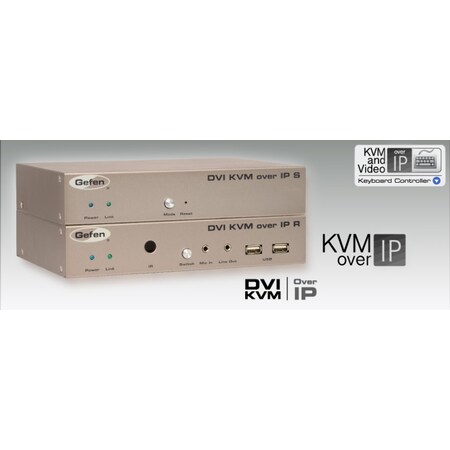
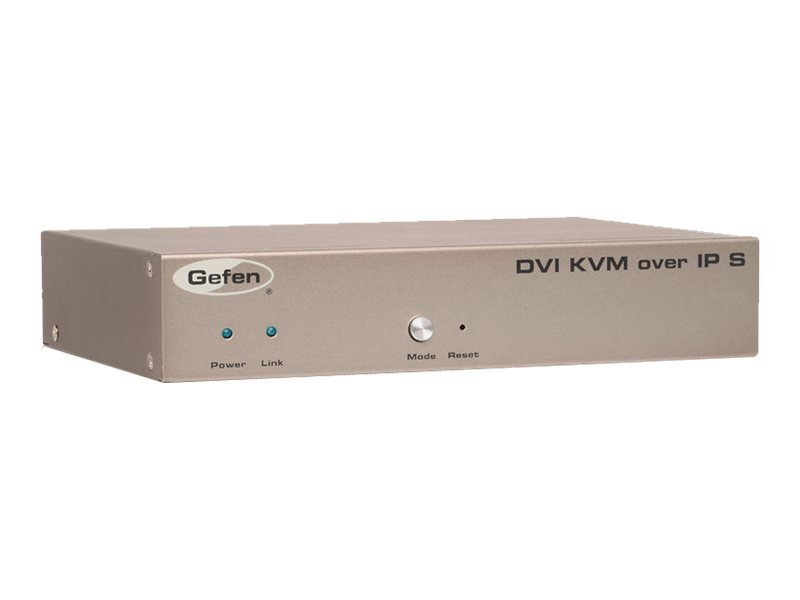
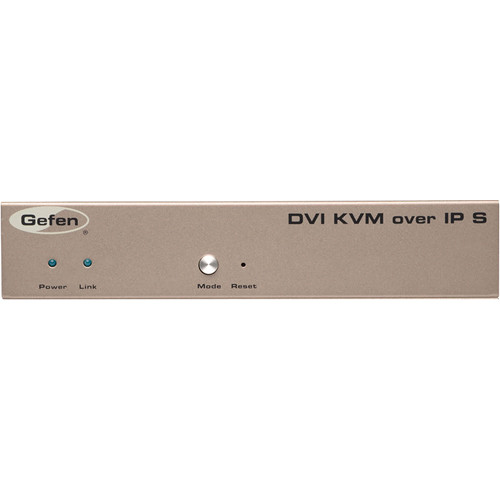
Extend and Distribute DVI, USB, RS-232, IR, and 2-way audio over a Local Area Network using any combination of HDMI, DVI, and VGA Senders and Receivers</p><p>The DVI KVM over IP extends DVI, USB, 2-way analog audio, RS-232, and IR, over a Gigabit Local Area Network. Resolutions up to 1080p Full HD and 1920 x 1200 (WUXGA) are supported. HDMI digital audio is also supported when using HDMI sources and displays with HDMI-to-DVI adapters. The Sender and Receiver units can be automatically or manually configured to unique IP addresses to allow the connection of multiple Senders and Receivers to the same network. Multiple Receiver units can simultaneously connect to any Sender unit within the network to create a virtual crosspoint matrix of 256 Senders and up to a theoretical limit of just over 65,000 units total, depending on the network bandwidth and number of ports on the network switch. Any combination of HDMI, DVI, and VGA Senders and Receivers can be used**. Each Receiver unit has a built-in Ethernet switch and two additional RJ-45 Ethernet ports to allow for the connection of computers and other IP-enabled devices. USB 2.0 data rates up to 480 Mbps are supported in addition to backward-compatibility with USB 1.1. Each Receiver unit provides two USB ports with up to 500mA current draw per connector, providing access to keyboard, mouse, and other compatible devices. Bi-directional analog audio capability allows audio to be transported between the Sender and the Receiver units. The built-in mic pre-amp on the Receiver unit ensures compatibility with a variety of microphones. IR commands from the Receiver side can be extended to sources connected to any of the Senders units. RS-232 serial control can also be extended between each Sender and Receiver unit. The built-in Web server interface makes set-up and configuration simple and intuitive. The DVI KVM over IP is perfect for large scale remote workstation access and digital signage applications. </p><p>** When using HDCP-encrypted content, only HDMI Senders and Receiver units can accept and display the content.</p><p>How It Works <br /> </p><p>If you are connecting multiple Sender units, use the built-in Web interface to assign a unique channel IDs to the Sender units. Use the included DVI cable to connect a computer or other DVI source to the Sender's DVI input. Use the included USB and RS-232 cables to connect the computer's USB and RS-232 interfaces to the Sender unit. Connect audio Line In and audio Line Out as needed to the Sender. If your computer or other source is IR controllable, connect a Gefen IR emitter to the Sender and attach it to the IR sensor lens of the source. Connect the DVI output of the Receiver to your Hi-Def display. Connect your USB devices, RS-232 devices, microphone, and headphones or amplified speakers to the Receiver unit. If the Receiver is not installed in the line-of-sight of the end-user, and IR commands will need to be sent to the source, connect a Gefen IR extender (EXT-RMT-EXTIRC or EXT-RMT-EXTIRN) to the Receiver. Connect the Sender and Receiver units to each other directly or through a Gigabit Ethernet switch, using CAT-5e or better cables. Each cable run can be up to 330 feet (100 meters) in length. If the Sender is connected to your LAN, you can use the two additional RJ-45 ports on the Receiver to connect computers and other IP enabled devices. Connect the included 5V power supplies to the Sender and Receiver units and to available electrical outlets. Power-on all associated equipment. Use the Mode button on the Sender to optimize the picture for sharper still images or smoother video motion. When using multiple Senders and Receivers as a "Virtual Matrix", use the Switch button on the Receiver or the web interface to switch between Senders. </p><p>Note: A Gigabit switch is required. The Gigabit switch must support 8k jumbo frame packets in order for multicast mode to operate. If your LAN is not dedicated to Gefen KVM-LAN products exclusively, then a managed switch is highly recommended.</p>

Gallery

Attributes

Brand name, Manufacturer nameGefen Inc
ManufacturerGefen Inc Core Brands LLC Gefen
moq, multiple, tierMinQty1, Case, NumberOfItems, Number_of_items, PackageQuantity1
MPNGEF-DVIKVM-LANTX EXT-DVIKVM-LANTX
qtyInStockdropship
snippetExtend and Distribute DVI, USB, RS-232, IR, and 2-way audio over a Local Area Network using any combination of HDMI, DVI, and VGA Senders and Receivers</p><p>The DVI KVM over IP extends DVI, USB, 2-way analog audio, RS-232, and IR, over a Gigabit Local Area Network. Resolutions up to 1080p Full HD and 1920 x 1200 (WUXGA) are supported. HDMI digital audio is also supported when using HDMI sources and displays with HDMI-to-DVI adapters. The Sender and Receiver units can be automatically or manually configured to unique IP addresses to allow the connection of multiple Senders and Receivers to the same network. Multiple Receiver units can simultaneously connect to any Sender unit within the network to create a virtual crosspoint matrix of 256 Senders and up to a theoretical limit of just over 65,000 units total, depending on the network bandwidth and number of ports on the network switch. Any combination of HDMI, DVI, and VGA Senders and Receivers can be used**. Each Receiver unit has a built-in Ethernet switch and two additional RJ-45 Ethernet ports to allow for the connection of computers and other IP-enabled devices. USB 2.0 data rates up to 480 Mbps are supported in addition to backward-compatibility with USB 1.1. Each Receiver unit provides two USB ports with up to 500mA current draw per connector, providing access to keyboard, mouse, and other compatible devices. Bi-directional analog audio capability allows audio to be transported between the Sender and the Receiver units. The built-in mic pre-amp on the Receiver unit ensures compatibility with a variety of microphones. IR commands from the Receiver side can be extended to sources connected to any of the Senders units. RS-232 serial control can also be extended between each Sender and Receiver unit. The built-in Web server interface makes set-up and configuration simple and intuitive. The DVI KVM over IP is perfect for large scale remote workstation access and digital signage applications. </p><p>** When using HDCP-encrypted content, only HDMI Senders and Receiver units can accept and display the content.</p><p>How It Works <br /> </p><p>If you are connecting multiple Sender units, use the built-in Web interface to assign a unique channel IDs to the Sender units. Use the included DVI cable to connect a computer or other DVI source to the Sender's DVI input. Use the included USB and RS-232 cables to connect the computer's USB and RS-232 interfaces to the Sender unit. Connect audio Line In and audio Line Out as needed to the Sender. If your computer or other source is IR controllable, connect a Gefen IR emitter to the Sender and attach it to the IR sensor lens of the source. Connect the DVI output of the Receiver to your Hi-Def display. Connect your USB devices, RS-232 devices, microphone, and headphones or amplified speakers to the Receiver unit. If the Receiver is not installed in the line-of-sight of the end-user, and IR commands will need to be sent to the source, connect a Gefen IR extender (EXT-RMT-EXTIRC or EXT-RMT-EXTIRN) to the Receiver. Connect the Sender and Receiver units to each other directly or through a Gigabit Ethernet switch, using CAT-5e or better cables. Each cable run can be up to 330 feet (100 meters) in length. If the Sender is connected to your LAN, you can use the two additional RJ-45 ports on the Receiver to connect computers and other IP enabled devices. Connect the included 5V power supplies to the Sender and Receiver units and to available electrical outlets. Power-on all associated equipment. Use the Mode button on the Sender to optimize the picture for sharper still images or smoother video motion. When using multiple Senders and Receivers as a "Virtual Matrix", use the Switch button on the Receiver or the web interface to switch between Senders. </p><p>Note: A Gigabit switch is required. The Gigabit switch must support 8k jumbo frame packets in order for multicast mode to operate. If your LAN is not dedicated to Gefen KVM-LAN products exclusively, then a managed switch is highly recommended.</p>
tierPrice1502.95
UPC, EAN, EANList, UPCList809393892540
Part Number, Model, Keyword, ModelNumber, Model_number, PartNumber, Part_numberEXT-DVIKVM-LANTX
Product GroupSpeakers
ASIN, AsinB00GHUPCBE
AdultProduct, Autographed, Batteries_included, Batteries_required, Memorabilia, TradeInEligibleFalse
Amount499.00
Binding, CatElectronics
Brand, ManGefen
Bullet_pointMade in Taiwan Offers premium quality at outstanding saving This Product helps maximize the value of integrated systems
CatId172282
CatTree172282 172532 172540 281407 464418 493964
CatalogNumberListMSS782593I01
ClassificationId464418
Compatible_devicesPC
Compliance_typeon_product_combined_cancer_reproductive
Cpsia_cautionary_statementno_warning_applicable
Currency, CurrencyCodeUSD
DisplayNameCables
Externally_assigned_product_identifier, Identifier00845344078984 0809393892540 0845344078984 809393892540 845344078984
FeatureAny combination of HDMI, DVI, and VGA senders and receivers can be used together to create a virtual matrix
FetchTime1568795248 1648324746 1648328422 1665177740 1704570218
FormatCD-ROM
Generic_keywordNetworking; Networking Other; Other Networking Devices; Electronic Products
Height181 204 27 3.799999996124 31 36.068 4.3
IdentifierTypeEAN GTIN UPC
ItemClassificationBASE_PRODUCT
ItemName, Item_nameGEFEN EXT-DVIKVM-LANTX Networking Device
Item_package_weight2.087
Item_type_keywordhdmi-cables
Item_type_nameGEFEN EXT-DVIKVM-LANTX networking device
Item_weight2.7
Label, Publisher, StudioCore Brands LLC Gefen
Length10 10.0 14.199999985516 9.652
Linkhttps://m.media-amazon.com/images/I/31CjhZva0YL._SL75_.jpg https://m.media-amazon.com/images/I/31CjhZva0YL.jpg https://m.media-amazon.com/images/I/31vLGHAxihL._SL75_.jpg https://m.media-amazon.com/images/I/31vLGHAxihL.jpg
List_price499.0
Marketplace_idATVPDKIKX0DER
OperatingSystemN/A
ProductCategoryId202505011
ProductGroupPersonal Computer Speakers
ProductTypeCE_ACCESSORY
ProductTypeNameABIS_ELECTRONICS CE_ACCESSORY ELECTRONIC_CABLE
Product_site_launch_date2013-11-06T19:05:53.017Z
Rank20702
TitleGEFEN EXT-DVIKVM-LANTX Networking Device Gefen DVI KVM over IP - Sender Package
Typeean gtin upc
URLhttp://ecx.images-amazon.com/images/I/31vLGHAxihL._SL75_.jpg https://m.media-amazon.com/images/I/31vLGHAxihL._SL75_.jpg
Unitcentimeters inches kilograms pounds
Unitsinches pixels pounds
VariantMAIN PT01
WarrantyNot Applicable
WebsiteDisplayGrouppc_display_on_website
WebsiteDisplayGroupNamePersonal Computer
Weight2.7 4.60104740794
Width11.899999987862 30.226 500 75 8.8

Distributor offers

SellerSKUMOQIn stockMultiplePrices
MarkertekGEF-DVIKVM-LANTX1dropship11 @ $502.95
Filmtools64264111 @ $419.56
Herman Pro AVGEFEXTDVIKVMLANTX11
ZoroG9048972111 @ $499.00
CDW3246813111 @ $0.00
unbeatablesale.comDBTB73231Out Of Stock11 @ $396.52
PCNation3186AN111 @ $323.33
bhphotovideo.comGEIKVMLANTX111 @ $329.95
AdoramaGEDKVMLANTX111 @ $349.00

Related on Amazon

As an Amazon Associate, we earn from qualifying purchases. (paid link) CERTAIN CONTENT THAT APPEARS ON THIS SITE COMES FROM AMAZON. THIS CONTENT IS PROVIDED 'AS IS' AND IS SUBJECT TO CHANGE OR REMOVAL AT ANY TIME.

GEFEN EXT-DVIKVM-LANTX Networking Device
Brand: Gefen
Details
  • Offers premium quality at outstanding saving
  • This Product helps maximize the value of integrated systems
  • Made in Taiwan
Listing
BindingElectronics
Product groupPersonal Computer
Product typeELECTRONIC_CABLE
ModelEXT-DVIKVM-LANTX
Part numberEXT-DVIKVM-LANTX
Items per pack1
LabelCore Brands LLC
ManufacturerCore Brands LLC
Catalog
FeatureAny combination of HDMI, DVI, and VGA senders and receivers can be used together to create a virtual matrix
CategoryElectronics
MPNEXT-DVIKVM-LANTX
UPC809393892540
EAN809393892540
Product groupSpeakers
Product typeABIS_ELECTRONICS
ManufacturerGefen
View on Amazon (paid link)